WD3000JB Western Digital 3.5″ hard drive with a storage capacity of 300GB and featuring an IDE interface.
All information about the Western Digital WD3000JB hard disk drive: technical parameters, failure symptoms, frequently asked questions, reviews, HDD repair and data recovery.
Western Digital WD3000JB Technical Details:
- Hard Disk Model: WDC WD3000JB-
- Disk Family: Caviar SE
- Form Factor: 3.5″
- Capacity: 300 GB (300 x 1 000 000 000 bytes)
- Rotational Speed: 5400 RPM
- Rotation Time: 11.11 ms
- Average Rotational Latency: 5.56 ms
- Disk Interface: Ultra-ATA/100
- Buffer-Host Max. Rate: 100 MB/seconds
- Buffer Size: 8192 KB
- Drive Ready Time (typical): 7 seconds
- Average Seek Time: 8.9 ms
- Track To Track Seek Time: 2 ms
- Full Stroke Seek Time: 21 ms
- Width: 101.6 mm (3.98 inch)
- Depth: 147 mm (5.79 inch)
- Height: 25.4 mm (0.98 inch)
- Manufacturer: Western Digital Corporation
Western Digital WD3000JB Hard Drives:
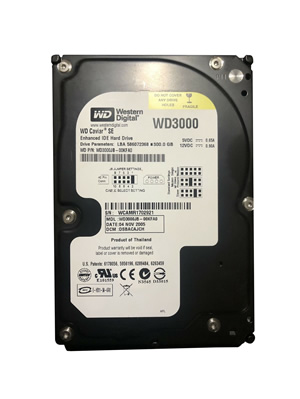
- WD3000JB WD 3.5″ 300 GB Ultra-ATA/100 Caviar SE 5400 RPM Hard Drive.
Western Digital WD3000JB Failure Symptoms:
- Electrical Failure Symptoms:
Drive is powered, but shows no sign of function;
Disk knocking as the motor fails to spin;
Clicking sound as the heads search or initialize; - Mechanical Failure Symptoms:
Clicking, grinding sounds;
Completely quiet due to ” motor freeze”;
“music” tone as the disk is powered up; - Logical Failure Examples:
Accidental deletion, accidental format, file corruption, software bugs, file system corruption, viruses and malware, and many, many more. - Firmware Failure Symptoms:
drive powers up, but is not recognised by the computer;
Drive powers up, but is recognised wrongly, sometimes with nonsensical characters;
Drive freezes during booting up; - Bad Platter Area Symptoms:
Hard disk still accessible but appear to “hang” or “sluggish”;
Constant Cyclic Redundancy (CRC) errors;
Unable to access folders or files which could be seen; - Complex Failure Model
Western Digital WD3000JB Data Recovery & HDD Repair:
When it comes to data recovery one of the most common problems Western Digital WD3000JB hard drive experience is a burned circuit board (PCB). Therefore, if you need to replace the PCB, be sure to match the “PCB Number” of the current board, such as 2060-701314-003, etc.