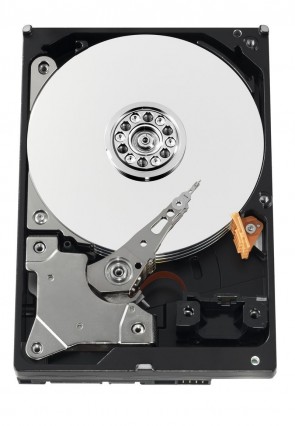
HGST HDS724040ALE640 3.5″ hard drive with a storage capacity of 4 TB and featuring a SATA interface. HGST HDS724040ALE640 Deskstar 7K4000 4 TB 3.5″ Internal Hard Drive Serial ATA-600 7200 RPM 64 MB Buffer.

All information about the HGST HDS724040ALE640 hard disk drive: technical parameters, failure symptoms, frequently asked questions, reviews, HDD repair and data recovery.

HGST HDS724040ALE640

HGST HDS724040ALE640 Technical Details:

Manufacturer:
HGST (Hitachi Global Storage Technologies)
Hard Disk Model:
HDS724040ALE640
Disk Family:
Deskstar 7K4000 (Performance series)
Form Factor:
3.5″
Capacity:
4 TB (4,000,000,000,000 bytes)
Formatted Capacity:
Approximately 3.63 TB
Number Of Disks:
4
Number Of Heads:
8
Rotational Speed:
7200 RPM
Average Seek Time:
8.5 ms (read) / 9.5 ms (write)
Disk Interface:
Serial ATA-600 (SATA 6 Gb/s)
Buffer Size:
65536 KB (64 MB)
External Transfer Rate:
600 MB/s
Internal Transfer Rate:
Up to 205 MB/s
Mean Time Between Failures (MTBF):
1,000,000 hours
Advanced Format:
512e (512-byte emulation, 4K physical sectors)

Note: The HGST HDS724040ALE640 is part of the Deskstar 7K4000 series, released around 2012-2013. This was HGST’s flagship high-performance consumer drive, offering 4 TB of storage at 7200 RPM. The 7K4000 series featured 4 platters and 8 heads, delivering excellent capacity and performance. It was one of the first 4 TB consumer drives on the market and became a favorite among NAS and RAID users.


HGST HDS724040ALE640 Hard Drives:

  • HDS724040ALE640 – 4 TB SATA 3.5″ Performance Hard Drive, Deskstar 7K4000 series
  • Model code breakdown: HDS72 (Deskstar 7K4000 series) + 4040 (4 TB capacity) + ALE640 (SATA 6Gb/s, 64 MB cache)
  • Common firmware revisions: 5C0, 5C1, 5E0, 5F0, M5A0
  • Capacity in LBA: 7,814,037,168 sectors
  • Also known as: Hitachi HDS724040ALE640 (pre-acquisition branding)
  • Recommended usage: High-capacity desktop, NAS, RAID, media servers

HGST HDS724040ALE640 Failure Symptoms:

Electrical Failure Symptoms:

  • Drive is powered, but shows no sign of function;
  • Disk knocking as the motor fails to spin;
  • Clicking sound as the heads search or initialize;
  • Burnt components on PCB.

Mechanical Failure Symptoms:

  • Clicking, grinding sounds;
  • Completely quiet due to “motor freeze”;
  • Drive spins but produces rhythmic clicking – typical of head failure;
  • Occasional “scraping” sound.

Logical Failure Examples:

  • Accidental deletion, accidental format, file corruption;
  • File system corruption, viruses and malware;
  • Partition table loss or MBR/GPT corruption.

Firmware Failure Symptoms:

  • Drive powers up but is not recognised;
  • Drive recognised wrongly with nonsensical characters;
  • Drive freezes during booting up;
  • Drive detected with 0 MB capacity.

Bad Platter Area Symptoms:

  • Hard disk appears to “hang” or be “sluggish”;
  • Constant Cyclic Redundancy Check (CRC) errors;
  • Unable to access folders or files;
  • Gradual increase of reallocated sector count.

Complex Failure Model

(A combination of two or more of the above failure types)


HGST HDS724040ALE640 Data Recovery & HDD Repair:

Common problems for the HDS724040ALE640 include PCB failure, firmware corruption, and head failure.

PCB Replacement Information:

To replace a faulty PCB, match the following:

  • Model number: HDS724040ALE640
  • PCB part number: Common numbers include 0A90020, 0A90021, 0A90720
  • Main controller IC number: Often 88i9346 (Marvell)
  • Firmware revision: e.g., 5C0, 5C1, 5E0

⚠️ Critical Note: You MUST transfer the original ROM chip from the old PCB to the new donor board. Without this, the drive will not function correctly.

Symptom Analysis:

Symptom
Likely Cause
Recommended Action
Drive dead (no spin)
PCB failure
Replace PCB; transfer ROM chip
Spins but not detected
Firmware corruption
Professional repair with PC-3000 or MRT
Rhythmic clicking
Head failure
Cleanroom head swap required
Extremely slow access
Bad sectors
Disk imaging with ddrescue

Repair Options by Failure Type:

Failure Type
Solution
Requirements
Burnt PCB
Replace PCB; transfer ROM chip
Donor board + soldering/programmer
Firmware corruption
Professional repair
PC-3000 or MRT
Head failure
Head/platter swap
Cleanroom + donor drive
Bad sectors
Disk imaging
ddrescue or PC-3000
Logical failure
Software recovery
TestDisk / R-Studio


Frequently Asked Questions (FAQs):

Q: What is the capacity of the HDS724040ALE640?
A: 4 TB (approximately 3.63 TB formatted).

Q: What is the RPM and cache?
A: 7200 RPM and 64 MB cache.

Q: Is this drive good for NAS?
A: Yes, the 7K4000 series was popular for NAS and RAID use. However, ensure your NAS supports 4 TB drives.

Q: What are the 4 TB compatibility issues?
A: 4 TB drives require:
– UEFI BIOS (not legacy BIOS)
– 64-bit operating system
– GPT partition table

Q: Is this drive worth buying today?
A: For legacy system repair, yes. For new builds, modern drives (6TB-20TB) offer better value.


User Reviews & Summary:

Pros:
– 4 TB high capacity for its era
– 7200 RPM performance
– 64 MB cache
– 1 million hour MTBF
– Excellent for NAS and RAID
– Highly reliable

Cons:
– 4 TB may have compatibility issues on older systems
– Discontinued – used only
– 4 platters, 8 heads – more potential failure points

Final Verdict:
The HGST HDS724040ALE640 (Deskstar 7K4000, 4 TB) was a groundbreaking high-capacity performance drive. While now obsolete for primary storage, it remains a solid choice for legacy NAS systems.

Pro Data Recovery Tip: The 7K4000 series is generally reliable, but as with all mechanical drives, monitor SMART attributes regularly, especially 05 (Reallocated Sectors) and C5 (Pending Sectors).

💠

🔵 Best-selling data storage everyone's buying.

Fast, reliable, and on sale now. Thousands pick these weekly — don't miss Amazon's lowest storage prices.

Top 10 Bestsellers
🏆 4.7★+ Reviews
📦 Prime Shipping
👉 See today's best-selling hard drives, USB flash drives & SSDs on Amazon.com HDD · USB Flash Drives · SSD · External Drives
🛒
✅ Updated hourly — Amazon real-time ranking 🔥 Limited stock deals 🔗 Affiliate
⭐ Click to see complete best-selling list ⭐

Leave a Reply