Western Digital WD4000BMVU 2.5″ external hard drive with a storage capacity of 400GB and featuring a USB 3.0 interface.
All information about the Western Digital WD4000BMVU external hard disk drive: technical parameters, failure symptoms, frequently asked questions, reviews, HDD repair and data recovery.
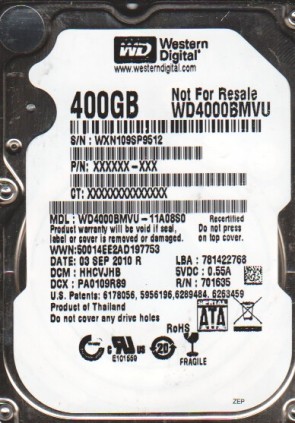
Western Digital WD4000BMVU Technical Details:
- Hard Disk Model: WDC WD4000BMVU
- Disk Family: Scorpio Blue (External Embedded)
- Form Factor: 2.5″
- Capacity: 400 GB (400 x 1 000 000 000 bytes)
- Number Of Disks: 2
- Number Of Heads: 4
- Rotational Speed: 5400 RPM
- Rotation Time: 11.11 ms
- Average Rotational Latency: 5.56 ms
- Disk Interface: USB 2.0 (On-board Native USB)
- Buffer-Host Max. Rate: 60 MB/seconds
- Buffer Size: 8192 KB
- Average Seek Time: 12.0 ms
- Width: 69.85 mm (2.75 inch)
- Depth: 100.2 mm (3.94 inch)
- Height: 9.5 mm (0.37 inch)
- Weight: 117 grams (0.26 pounds)
- Acoustic (Idle): 2.4 Bel
- Required Power For Spinup: 500 mA
- Power Required (Seek): 2.5 W
- Power Required (Idle): 0.85 W
- Power Required (Standby): 0.25 W
- Manufacturer: Western Digital Technologies, Inc.
Western Digital WD4000BMVU Hard Drives:
- WD4000BMVU-11A08S0, DCM HHCVJHB, Western Digital 400GB USB 2.5″ Hard Drive
Western Digital WD4000BMVU Failure Symptoms:
- Electrical Failure Symptoms:
Drive is powered, but shows no sign of function;
Disk knocking as the motor fails to spin;
Clicking sound as the heads search or initialize; - Mechanical Failure Symptoms:
Clicking, grinding sounds;
Completely quiet due to ” motor freeze”;
“music” tone as the disk is powered up; - Logical Failure Examples:
Accidental deletion, accidental format, file corruption, software bugs, file system corruption, viruses and malware, and many, many more. - Firmware Failure Symptoms:
drive powers up, but is not recognised by the computer;
Drive powers up, but is recognised wrongly, sometimes with nonsensical characters;
Drive freezes during booting up; - Bad Platter Area Symptoms:
Hard disk still accessible but appear to “hang” or “sluggish”;
Constant Cyclic Redundancy (CRC) errors;
Unable to access folders or files which could be seen; - Complex Failure Model
Western Digital WD4000BMVU Data Recovery & HDD Repair:
When it comes to data recovery one of the most common problems Western Digital WD4000BMVU hard drive experience is a burned circuit board (PCB). Therefore, if you need to replace the PCB, be sure to match the “PCB Number” of the current board, such as 2060-701635-001 REV P1, etc.