5A250J0 Maxtor 3.5″ hard drive with a storage capacity of 250 GB and featuring a IDE interface. 5A250J0 MAXTOR 3.5″ 250 GB Ultra-ATA/133 MaXLine II 5400 RPM Hard Drive.
All information about the Maxtor 5A250J0 hard disk drive: technical parameters, failure symptoms, free asked questions, reviews, HDD repair and data recovery.
Maxtor 5A250J0 Technical Details:
- Hard Disk Model: MAXTOR 5A250J0
- Disk Family: MaXLine II
- Form Factor: 3.5″
- Capacity: 250 GB (250 x 1 000 000 000 bytes)
- Number Of Disks: 4
- Number Of Heads: 8
- Rotational Speed: 5400 RPM
- Rotation Time: 11.11 ms
- Average Rotational Latency: 5.56 ms
- Disk Interface: Ultra-ATA/133
- Buffer-Host Max. Rate: 133 MB/seconds
- Buffer Size: 2048 KB
- Average Seek Time: 10 ms
- Width: 101.6 mm (3.98 inch)
- Depth: 147 mm (5.79 inch)
- Height: 26.1 mm (1.02 inch)
- Weight: 620 grams (1.37 pounds)
- Acoustic (Idle): 3.5 Bel
- Acoustic (Min performance and volume): 2.7 Bel
- Acoustic (Max performance and volume): 2.7 Bel
- Required Power For Spinup: 1520 mA
- Power Required (Seek): 12.2 W
- Power Required (Idle): 7.3 W
- Power Required (Standby): 0.9 W
- Manufacturer: Seagate Corporation
Maxtor 5A250J0 Hard Drives:
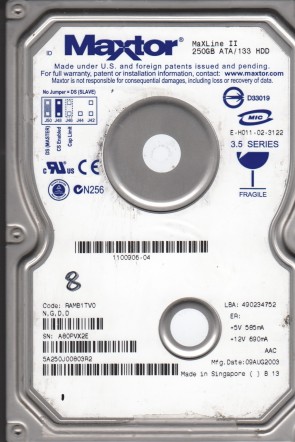
- 5A250J0 MAXTOR 3.5″ 250 GB Ultra-ATA/133 MaXLine II 5400 RPM Hard Drive.
Maxtor 5A250J0 Failure Symptoms:
- Electrical Failure Symptoms:
Drive is powered, but shows no sign of function;
Disk knocking as the motor fails to spin;
Clicking sound as the heads search or initialize; - Mechanical Failure Symptoms:
Clicking, grinding sounds;
Completely quiet due to ” motor freeze”;
“music” tone as the disk is powered up; - Logical Failure Examples:
Accidental deletion, accidental format, file corruption, software bugs, file system corruption, viruses and malware, and many, many more. - Firmware Failure Symptoms:
drive powers up, but is not recognised by the computer;
Drive powers up, but is recognised wrongly, sometimes with nonsensical characters;
Drive freezes during booting up; - Bad Platter Area Symptoms:
Hard disk still accessible but appear to “hang” or “sluggish”;
Constant Cyclic Redundancy (CRC) errors;
Unable to access folders or files which could be seen; - Complex Failure Model
Maxtor 5A250J0 Data Recovery & HDD Repair:
When it comes to data recovery one of the most common problems Maxtor 5A250J0 hard drive experience is a burned circuit board (PCB). Therefore, if you need to replace the PCB, be sure to match the “Main Contorl Chip Number” or “Board Number” of the current board, such as 040108000, etc.