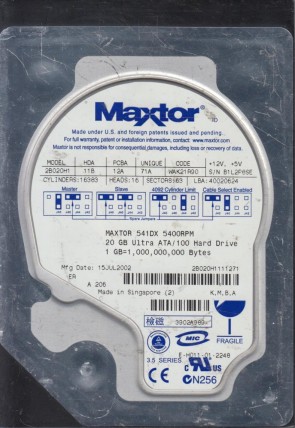
Maxtor 2B020H1 3.5″ hard drive with a storage capacity of 20 GB and featuring an IDE interface. Maxtor 2B020H1 Fireball 20 GB 3.5″ Internal Hard Drive IDE Ultra ATA/100 (ATA-6) 5400 rpm 2 MB Buffer.
All information about the Maxtor 2B020H1 hard disk drive: technical parameters, failure symptoms, frequently asked questions, reviews, HDD repair and data recovery.

Maxtor 2B020H1 Technical Details:
Note: The 2B020H1 is a capacity upgrade from the 2B010H1 (10 GB), sharing the same single-platter, single-head design. It was one of the industry’s first drives to achieve 20 GB on a single platter.
Maxtor 2B020H1 Hard Drives:
- 2B020H1, firmware versions WAK21R90 or WAH21PB – Maxtor 20GB IDE 3.5″ Hard Drive
- Full TLA code example: 2B020H1111232
- PCB board number: 301535100, etc.
- Main controller IC number: 040108200 (POKER C.6), etc.
Maxtor 2B020H1 Failure Symptoms:
Electrical Failure Symptoms:
- Drive is powered, but shows no sign of function;
- Disk knocking as the motor fails to spin;
- Clicking sound as the heads search or initialize.
Mechanical Failure Symptoms:
- Clicking, grinding sounds;
- Completely quiet due to “motor freeze”;
- “Music” tone as the disk is powered up (spindle bearing vibration).
Logical Failure Examples:
- Accidental deletion, accidental format, file corruption, software bugs;
- File system corruption, viruses and malware.
Firmware Failure Symptoms:
- Drive powers up but is not recognised by the computer;
- Drive powers up but is recognised wrongly, sometimes with nonsensical characters;
- Drive freezes during booting up.
Bad Platter Area Symptoms:
- Hard disk still accessible but appears to “hang” or be “sluggish”;
- Constant Cyclic Redundancy Check (CRC) errors;
- Unable to access folders or files which could be seen.
Complex Failure Model
(A combination of two or more of the above failure types)
Maxtor 2B020H1 Data Recovery & HDD Repair:
When it comes to data recovery, one of the most common problems the Maxtor 2B020H1 hard drive experiences is a burnt circuit board (PCB). Therefore, if you need to replace the PCB, you must match the “Main Controller IC Number” of your current circuit board in addition to the hard drive’s “Model Number”.
Multiple Main Controller IC Number revisions:
- 040108200 (POKER C.6)
- Other variants
Multiple Board Number revisions:
- 301535100
- Other revisions
⚠️ Critical Note: Unlike many other hard drives, the 2B020H1 has its ROM code masked inside the main controller (DSP) chip – there is no separate ROM chip to transfer. This means:
- Matching the model number alone is insufficient.
- PCB replacement requires an identical PCB revision number and main controller chip number.
- Even with a matching PCB, if the drive still clicks or is not detected, the problem is typically head failure, not a compatibility issue.
Repair & Data Recovery Options by Failure Type:
Comparison with Related Maxtor Model:
Frequently Asked Questions (FAQs):
Q: Is the Maxtor 2B020H1 a 3.5″ or 2.5″ drive?
A: It is a 3.5-inch desktop hard drive.
Q: What is the capacity of the 2B020H1?
A: 20 GB.
Q: What is the RPM and cache size?
A: 5400 RPM and 2 MB cache.
Q: What interface does the 2B020H1 use?
A: IDE (PATA) with Ultra ATA/100 support.
Q: What is the difference between the 2B020H1 and the 2B010H1?
A: They belong to the same Fireball series. The main difference is capacity (20 GB vs 10 GB). They share the same PCB, main controller, and failure patterns.
Q: My drive powers on but is not detected. What should I do?
A: Possible causes:
– PCB failure (check for burnt components)
– Firmware corruption (requires PC-3000 or similar professional tools)
– Head failure (usually accompanied by clicking sounds)
Q: How do I replace the PCB on a 2B020H1?
A: You need a donor board with identical specifications:
– Model: 2B020H1
– PCB board number: e.g., 301535100
– Main controller IC number: e.g., 040108200
– Firmware version: e.g., WAK21R90
Because there is no separate ROM chip to transfer, the donor board must be fully compatible.
Q: After replacing the PCB, the drive still clicks. What’s wrong?
A: This usually indicates head/preamp failure, not a PCB compatibility issue. In this case, a cleanroom head swap is required.
Q: Can the 2B020H1 be used with a modern computer?
A: Not directly. You would need a USB-to-IDE adapter or an IDE-to-SATA bridge. However, given its 20 GB capacity and very slow speed, its practical use is extremely limited.
Q: Is this drive worth buying today?
A: Generally no. This drive is over 20 years old. It may be used for retro computing projects (e.g., Windows 98/ME/2000 builds) as a collector’s item, but do not use it to store any important data.
User Reviews & Summary:
Pros (for its time):
– Single-platter, single-head design with low mechanical complexity
– 5400 RPM was mainstream performance at launch
– Fireball series known for reasonable reliability
Cons (by modern standards):
– 20 GB capacity is far too small
– IDE interface is completely obsolete
– Known failure patterns (PCB burn, firmware corruption, spindle vibration)
– Spare parts are very difficult to source
Final Verdict:
The Maxtor 2B020H1 is a 20 GB model from Maxtor’s Fireball 541DX series, sharing its design and failure characteristics with its smaller sibling, the 2B010H1 (10 GB). If you still have a working 2B020H1 today, it should only be used for retro computing storage as a collector’s item – never store irreplaceable data on it. For data recovery, DIY attempts beyond simple logical recovery have low success rates; professional recovery is strongly recommended for valuable data.