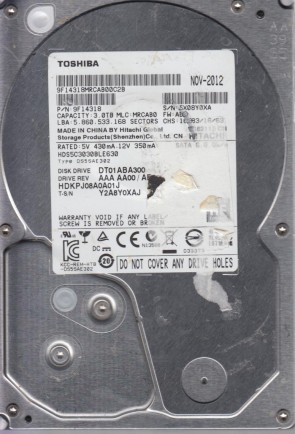
HGST HDS5C3030BLE630 3.5″ hard drive with a storage capacity of 3 TB and featuring a SATA interface. HGST HDS5C3030BLE630 Deskstar 5K3000 3 TB 3.5″ Internal Hard Drive Serial ATA-600 5400 RPM 32 MB Buffer.
All information about the HGST HDS5C3030BLE630 hard disk drive: technical parameters, failure symptoms, frequently asked questions, reviews, HDD repair and data recovery.

HGST HDS5C3030BLE630 Technical Details:
Note: The HGST HDS5C3030BLE630 is part of the Deskstar 5K3000 series, released around 2011-2012 following HGST’s acquisition by Western Digital. This series was designed for energy-efficient desktop and RAID storage, featuring CoolSpin technology for reduced power consumption and lower operating temperatures. The 5K3000 series was one of the first 3 TB consumer-grade drives available, offering high capacity at a competitive price point. Key features include Advanced Format 4K sectors and enhanced reliability for 24/7 operation in RAID environments.
HGST HDS5C3030BLE630 Hard Drives:
- HDS5C3030BLE630 – 3 TB SATA 3.5″ Energy-Efficient Hard Drive, Deskstar 5K3000 series
- Model code breakdown: HDS5C (Deskstar 5K3000 series) + 3030 (3 TB capacity) + BLE630 (specific variant identifier)
- Common firmware revisions: 5C0, 5C1, 5C2, 5E0
- Capacity in LBA: 5,860,533,168 sectors
- Also known as: Hitachi HDS5C3030BLE630 (pre-acquisition branding)
- Recommended usage: Desktop storage, RAID arrays, NAS, external enclosures
HGST HDS5C3030BLE630 Failure Symptoms:
Electrical Failure Symptoms:
- Drive is powered, but shows no sign of function;
- Disk knocking as the motor fails to spin;
- Clicking sound as the heads search or initialize;
- Burnt components on PCB – particularly TVS diodes or the motor controller IC.
Mechanical Failure Symptoms:
- Clicking, grinding sounds (head/media damage);
- Completely quiet due to “motor freeze” (bearing seizure);
- Drive spins but produces rhythmic clicking – typical of head failure;
- Occasional “scraping” sound indicating platter damage;
- High-pitched whine indicating spindle motor issues.
Logical Failure Examples:
- Accidental deletion, accidental format, file corruption, software bugs;
- File system corruption, viruses and malware;
- Partition table loss or MBR/GPT corruption;
- “SMART” failure warnings from BIOS or RAID controller.
Firmware Failure Symptoms:
- Drive powers up but is not recognised by the computer/RAID controller;
- Drive powers up but is recognised wrongly, sometimes with nonsensical characters;
- Drive freezes during booting up;
- Drive detected with 0 MB capacity (service area corruption);
- SMART attributes showing unusual values (e.g., 65535 or 0).
Bad Platter Area Symptoms:
- Hard disk still accessible but appears to “hang” or be “sluggish”;
- Constant Cyclic Redundancy Check (CRC) errors;
- Unable to access folders or files which could be seen;
- Gradual increase of reallocated sector count in SMART data;
- Pending sector count increasing over time.
Complex Failure Model
(A combination of two or more of the above failure types)
HGST HDS5C3030BLE630 Data Recovery & HDD Repair:
When it comes to data recovery, one of the most common problems the HGST HDS5C3030BLE630 hard drive experiences is PCB (circuit board) failure due to power surges, followed by firmware corruption and head failure. This drive has a separate ROM/NVRAM chip that stores drive-specific adaptation data.
PCB Replacement Information:
To replace a faulty PCB on a HGST HDS5C3030BLE630, you need to match the following:
- Model number: HDS5C3030BLE630
- PCB part number: Common numbers include 0A87091, 0A87092, 0A87093
- Main controller IC number: Often 88i9146 or similar (Marvell)
- Firmware revision: e.g., 5C0, 5C1, 5C2, 5E0
⚠️ Critical Note: The HGST HDS5C3030BLE630 has a separate ROM/NVRAM chip (usually 25P10VP or similar) on the PCB. This chip stores drive-specific calibration data, head maps, and adaptive parameters. When replacing the PCB, you MUST transfer the original ROM chip from the old PCB to the new donor board, or use a programmer to copy the ROM contents. Without this, the drive will not function correctly.
Symptom Analysis Based on User Reports:
Repair & Data Recovery Options by Failure Type:
Comparison with Related HGST Models:
Frequently Asked Questions (FAQs):
Q: Is the HGST HDS5C3030BLE630 a 3.5″ or 2.5″ drive?
A: It is a 3.5-inch desktop hard drive.
Q: What is the capacity of the HDS5C3030BLE630?
A: 3 TB (3,000,000,000,000 bytes). The formatted capacity is approximately 2.72 TB.
Q: What is the RPM and cache size?
A: 5400 RPM (CoolSpin technology) and 32 MB cache.
Q: What interface does the HDS5C3030BLE630 use?
A: Serial ATA (SATA) with SATA-600 (6 Gb/s) support.
Q: What is the Deskstar 5K3000 series?
A: The Deskstar 5K3000 series was HGST’s energy-efficient desktop hard drive line, released around 2011-2012. Key features include:
– CoolSpin technology for reduced power consumption
– 5400 RPM for quiet operation
– Advanced Format 4K sectors
– 1 million hour MTBF
Q: What does the model number HDS5C3030BLE630 mean?
A: The model number breaks down as:
– HDS5C = Deskstar 5K3000 series
– 3030 = 3 TB capacity
– BLE630 = Specific variant (SATA 6Gb/s, 32MB cache)
Q: My drive is dead and doesn’t spin. Can I replace the PCB myself?
A: Yes, but with important caveats. You need a donor PCB with:
– Identical model number (HDS5C3030BLE630)
– Identical PCB part number (e.g., 0A87091, 0A87092, 0A87093)
– Similar firmware revision
You MUST transfer the original ROM chip from the old PCB to the new donor board, or copy its contents using a programmer.
Q: My HDS5C3030BLE630 clicks rhythmically and is not detected. What’s wrong?
A: Rhythmic clicking (usually 5-10 clicks followed by motor stop) is a classic symptom of head failure. This requires a cleanroom head swap performed by a professional data recovery service.
Q: Is the HDS5C3030BLE630 compatible with 3 TB limitations on older systems?
A: No, this drive may have compatibility issues with older systems. 3 TB drives require:
– UEFI BIOS (not legacy BIOS)
– 64-bit operating system
– GPT partition table (not MBR)
On older systems, the drive may be detected as 746 GB or 2.2 TB only.
Q: What is the power consumption of this drive?
A: The HDS5C3030BLE630 typically consumes:
– Read/Write: ~5.4 W
– Idle: ~4.5 W
– Standby/Sleep: ~0.8 W
Q: Is this drive worth buying today?
A: For new builds, no – modern drives offer better capacity and performance. However, for legacy system repairs or budget external storage, a used HDS5C3030BLE630 may be adequate. Used units should be tested thoroughly with SMART diagnostics.
User Reviews & Summary:
Pros:
– 3 TB capacity – high for its time
– 1 million hour MTBF – good reliability
– CoolSpin technology – low power consumption
– Quiet operation – suitable for HTPC
– SATA 6 Gb/s – modern interface
– Good for RAID and NAS applications
Cons:
– 5400 RPM – slower than 7200 RPM drives
– 32 MB cache – modest by modern standards
– 3 TB may have compatibility issues on older systems
– Discontinued – only available used/refurbished
– 3 platters, 6 heads – more potential failure points
Final Verdict:
The HGST HDS5C3030BLE630 (Deskstar 5K3000, 3 TB) was a landmark drive in the early 2010s, making high-capacity storage affordable for consumers. While now obsolete for primary storage, it remains a viable option for legacy systems, external backups, or media storage. However, for critical data, modern drives are strongly recommended.
Pro Data Recovery Tip: The 5K3000 series is known for firmware issues that can cause BSY (busy) states. If the drive spins but is not detected, avoid repeated power cycling. Professional tools can often recover data by loading a compatible loader.