MJA2250BH FFS G1 Fujitsu 2.5″ hard drive with a storage capacity of 250GB and featuring a SATA interface.
All information about the Fujitsu MJA2250BH FFS G1 hard disk drive: technical parameters, failure symptoms, HDD PCB repair and recommended retailers.
Fujitsu MJA2250BH FFS G1 Technical Details:
- Hard Disk Model: FUJITSU MJA2250BH
- Disk Family: –
- Form Factor: 2.5″
- Capacity: 250 GB (250 x 1 000 000 000 bytes)
- Number Of Disks: 1
- Number Of Heads: 2
- Rotational Speed: 5400 RPM
- Rotation Time: 11.11 ms
- Average Rotational Latency: 5.56 ms
- Disk Interface: Serial-ATA/300
- Buffer-Host Max. Rate: 300 MB/seconds
- Buffer Size: 8192 KB
- Average Seek Time: 12 ms
- Track To Track Seek Time: 1.5 ms
- Full Stroke Seek Time: 22 ms
- Width: 70 mm (2.76 inch)
- Depth: 100 mm (3.94 inch)
- Height: 9.5 mm (0.37 inch)
- Weight: 101 grams (0.22 pounds)
- Acoustic (Idle): 2.5 Bel
- Required Power For Spinup: 1100 mA
- Power Required (Seek): 2.1 W
- Power Required (Idle): 0.8 W
- Power Required (Standby): 0.13 W
- Manufacturer: Fujitsu Computer Products of America, Inc.
Fujitsu MJA2250BH FFS G1 Hard Drives:
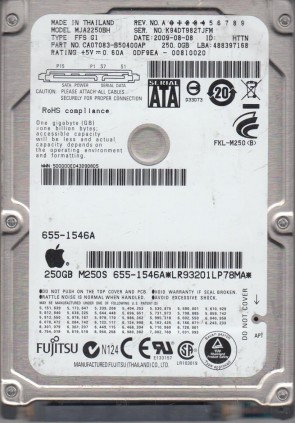
- MJA2250BH FFS G1, PN CA07083-B50400AP, Fujitsu 250GB SATA 2.5″ Hard Drive
- MJA2250BH FFS G1, PN CA07083-B50900AP, Fujitsu 250GB SATA 2.5″ Hard Drive
- MJA2250BH FFS G1, PN CA07083-B50500AP, Fujitsu 250GB SATA 2.5″ Hard Drive
Fujitsu MJA2250BH FFS G1 Failure Symptoms:
- Electrical Failure Symptoms:
Drive is powered, but shows no sign of function;
Disk knocking as the motor fails to spin;
Clicking sound as the heads search or initialize; - Mechanical Failure Symptoms:
Clicking, grinding sounds;
Completely quiet due to “motor freeze”;
“music” tone as the disk is powered up; - Logical Failure Examples:
Accidental deletion, accidental format, file corruption, software bugs, file system corruption, viruses and malware, and many, many more. - Firmware Failure Symptoms:
drive powers up, but is not recognised by the computer;
Drive powers up, but is recognised wrongly, sometimes with nonsensical characters;
Drive freezes during booting up; - Bad Platter Area Symptoms:
Hard disk still accessible but appear to “hang” or “sluggish”;
Constant Cyclic Redundancy (CRC) errors;
Unable to access folders or files which could be seen; - Complex Failure Model
Fujitsu MJA2250BH FFS G1 HDD PCB Repair:
When it comes to data recovery one of the most common problems Fujitsu MJA2250BH FFS G1 Hard Disk Drive experience is burnt circuit board(PCB). So if you will need to match a replacement PCB, it is important that you note the “PCB Number” of your current circuit board in addition to the hard drive’s “Model Number”.
Multiple PCB Number revisions:
CA26350-B10304BA, etc.
