Toshiba HDWR71A 3.5″ internal hard drive with a storage capacity of 10TB and featuring a SATA interface.
All information about the Toshiba HDWR71A hard disk drive: technical parameters, failure symptoms, HDD PCB repair and recommended retailers.
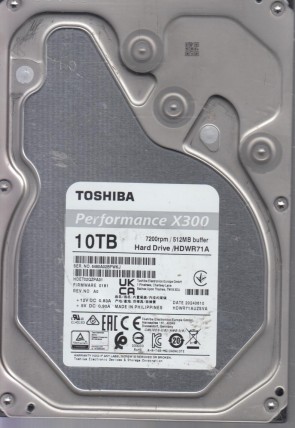
Toshiba HDWR71A Technical Details:
Manufacturer:
Toshiba Electronic Devices & Storage Corporation
Hard Disk Model:
HDWR71A (Model Code: HDWR71AUZSVA)
Disk Family:
Performance X300 Series (High-Performance Gaming & Desktop)
Form Factor:
3.5″ (Standard Internal Desktop Profile)
Capacity:
10 TB (10,000,000,000,000 bytes)
Formatted Capacity:
Approximately 9.09 TiB
Rotational Speed:
7200 RPM (High-velocity spindle motor)
Disk Interface:
Serial ATA-600 (SATA 6 Gb/s / SATA III)
Buffer Size:
524,288 KB (512 MB High-Speed Segmented Cache)
External Transfer Rate:
600 MB/s (SATA III interface maximum / Up to 248 MB/s sustained internal data rate)
Manufacturing Location:
Made in Philippines (As verified on label)
Firmware Version:
0101 (REV: A0)
Sector Format:
512e / Advanced Format (4K physical sectors / CMR technology)
Toshiba HDWR71A Hard Drives:
- HDWR71A – 10 TB SATA III 3.5″ Internal High-Performance Desktop Hard Drive, Performance X300 series
- Features a native 400-point tracking label with dynamic regulatory marks (CE, EAC, UKCA).
Toshiba HDWR71A Failure Symptoms:
- Rhythmic Metallic Knocking (Actuator Head Collapse):
Due to its high-speed 7200 RPM rotation, any acute case physical shocks while the drive is active can degrade the microscopic read/write head assembly. The drive will emit a distinct, sharp “click-click-click” sound as the damaged heads fail to lock onto internal servo tracks, followed by an immediate protection spin-down. - Firmware G-List Module Lockout (0-GB / Busy Status):
If high-density CMR platters accumulate bad sectors, the internal Growth List (G-List) can overflow. The drive’s controller firmware will lock down for self-protection; the disk spins up normally and smoothly with zero clicking noise, but it fails to register in the computer’s BIOS or shows up as a generic 0 GB volume. - Overvoltage TVS Diode Blowout (Completely Dead Circuit):
High-performance desktop power surges or faulty modular PSU cables can instantly short-circuit the overvoltage protection TVS diodes on the PCB. The drive will show absolutely no signs of life—no spin, no vibration, and no heat—and may cause the PC power supply to trip its safety shutdown loop. - Advanced Format Micro-Bad Sectors (100% Active Time Hang):
When underlying 4K physical blocks begin to face magnetic decay, reading files will suffer massive read-timeout latencies. Windows Task Manager will spike at 100% active disk time while real data throughput drops to 0 KB/s, freezing the system interface intermittently.
Toshiba HDWR71A HDD PCB Repair:
When it comes to data recovery one of the most common problems Toshiba HDWR71A hard drive experience is a burned circuit board (PCB). Therefore, if you need to replace the PCB, be sure to match the “PCB Number” of the current board, such as G0106A, etc.