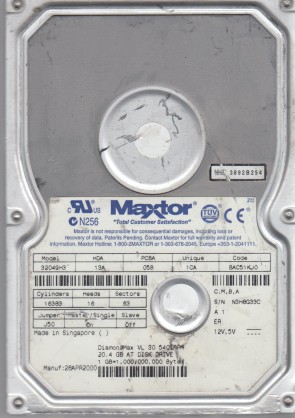
Maxtor 32049H3 3.5″ hard drive with a storage capacity of 20.4 GB and featuring an IDE interface. Maxtor 32049H3 DiamondMax 60 20.4 GB 3.5″ Internal Hard Drive IDE Ultra ATA/100 5400 RPM 2 MB Buffer.
All information about the Maxtor 32049H3 hard disk drive: technical parameters, failure symptoms, frequently asked questions, reviews, HDD repair and data recovery.

Maxtor 32049H3 Technical Details:
Note: The Maxtor 32049H3 is part of the DiamondMax 60 series, released around 2001-2002. This series was Maxtor’s mainstream desktop hard drive line, offering capacities from 20 GB to 60 GB. The DiamondMax 60 series used a single platter for the 20GB model (32049H3) and up to two platters for higher capacities. This series is known for its 5400 RPM spindle speed with Fluid Dynamic Bearing (FDB) motors, which provided quieter operation compared to ball-bearing motors of the era.
Maxtor 32049H3 Hard Drives:
- 32049H3 – 20.4 GB IDE 3.5″ Hard Drive, DiamondMax 60 series
- Model code breakdown: 3 (3.5″ form factor) + 2049 (20.49 GB capacity) + H3 (IDE interface, 2 heads)
- Common firmware revisions: FAK31A11, FAK31A1K
- Capacity in LBA: 40,020,624 sectors
- Also known as: Maxtor 4K020H3 (OEM variant)
Maxtor 32049H3 Failure Symptoms:
Electrical Failure Symptoms:
- Drive is powered, but shows no sign of function;
- Disk knocking as the motor fails to spin;
- Clicking sound as the heads search or initialize;
- Burnt components on PCB – particularly TVS diodes or the main controller IC.
Mechanical Failure Symptoms:
- Clicking, grinding sounds (head/media damage);
- Completely quiet due to “motor freeze” (bearing seizure);
- Drive spins but produces rhythmic clicking – typical of head failure;
- Occasional “scraping” sound indicating platter damage.
Logical Failure Examples:
- Accidental deletion, accidental format, file corruption, software bugs;
- File system corruption, viruses and malware;
- Partition table loss or MBR corruption;
- “SMART” failure warnings from BIOS.
Firmware Failure Symptoms:
- Drive powers up but is not recognised by the computer;
- Drive powers up but is recognised wrongly, sometimes with nonsensical characters;
- Drive freezes during booting up;
- Drive detected with 0 MB capacity (service area corruption).
Bad Platter Area Symptoms:
- Hard disk still accessible but appears to “hang” or be “sluggish”;
- Constant Cyclic Redundancy Check (CRC) errors;
- Unable to access folders or files which could be seen;
- Gradual increase of reallocated sector count in SMART data.
Complex Failure Model
(A combination of two or more of the above failure types)
Maxtor 32049H3 Data Recovery & HDD Repair:
When it comes to data recovery, one of the most common problems the Maxtor 32049H3 hard drive experiences is PCB (circuit board) failure due to power surges, followed by firmware corruption and head failure. This drive uses the same “Poker” PCB series as many other Maxtor drives of this era.
PCB Replacement Information:
To replace a faulty PCB on a Maxtor 32049H3, you need to match the following:
- Model number: 32049H3
- PCB part number: Common numbers include 1465, 1480, 1800 (Poker series)
- Main controller IC number: Often 040108200 or similar
- Firmware revision: e.g., FAK31A11, FAK31A1K
⚠️ Critical Note: Unlike Western Digital drives, the Maxtor 32049H3 does NOT have a separate ROM chip on the PCB. The firmware code is masked inside the main controller (DSP) chip. This means PCB replacement requires an identical donor board – there is no ROM to transfer. Even with a matching PCB, if the drive still clicks, the problem is likely head failure.
Symptom Analysis Based on User Reports:
Repair & Data Recovery Options by Failure Type:
Comparison with Related Maxtor Models:
Frequently Asked Questions (FAQs):
Q: Is the Maxtor 32049H3 a 3.5″ or 2.5″ drive?
A: It is a 3.5-inch desktop hard drive.
Q: What is the capacity of the 32049H3?
A: 20.4 GB (20,490 MB). The LBA capacity is 40,020,624 sectors.
Q: What is the RPM and cache size?
A: 5400 RPM and 2 MB cache.
Q: What interface does the 32049H3 use?
A: IDE (PATA) with Ultra ATA/100 support.
Q: What is the DiamondMax 60 series?
A: The DiamondMax 60 series was Maxtor’s mainstream desktop hard drive line released around 2001-2002, offering capacities from 20 GB to 60 GB. The “60” in the name refers to the maximum capacity of the series (60 GB). These drives used Fluid Dynamic Bearing (FDB) motors for quieter operation.
Q: What does the model number 32049H3 mean?
A: The model number breaks down as:
– 3 = 3.5″ form factor
– 2049 = 20.49 GB capacity
– H3 = IDE interface, 2 heads
Q: My drive is dead and doesn’t spin. Can I replace the PCB myself?
A: Yes, but with important caveats. You need a donor PCB with:
– Identical model number (32049H3)
– Identical PCB part number (e.g., 1465, 1480, 1800)
– Identical main controller IC number
– Similar firmware revision
There is no separate ROM chip to transfer – the donor board must be fully compatible. If the drive still clicks or is not detected after PCB swap, the problem is likely head failure.
Q: My 32049H3 clicks rhythmically and is not detected. What’s wrong?
A: Rhythmic clicking (usually 5-10 clicks followed by motor stop) is a classic symptom of head failure. The heads cannot read the servo tracks or firmware from the platters. This requires a cleanroom head swap performed by a professional data recovery service.
Q: Can I recover data from a 32049H3 with bad sectors?
A: Yes, you can try using ddrescue on Linux to create a disk image, skipping bad sectors. However, if the drive has physical damage (clicking, grinding), do not run ddrescue – seek professional help immediately.
Q: Is the 32049H3 compatible with Windows 10/11?
A: Not directly. Modern operating systems can be installed on IDE drives via adapters, but the 20 GB capacity is far too small for Windows 10/11. This drive is best suited for retro computing projects (Windows 98, Windows ME, Windows 2000, early Windows XP).
Q: What are the common firmware issues on this drive?
A: The 32049H3 can experience Service Area corruption where the drive spins but is not detected or shows 0 MB capacity. This requires professional tools like PC-3000 or MRT to repair modules 0A, 47, and others in the service area.
Q: Is this drive worth buying today?
A: Generally no. This drive is over 20 years old. It may be useful for retro computer builds (Windows 98/2000/XP era) as a period-appropriate storage device, but do not use it to store any important data. For data recovery purposes, the 32049H3 is considered a legacy drive with moderate recovery success rates when handled by professionals.
User Reviews & Summary:
Pros (for its time ~2001):
– Single-platter design for 20GB model – lower mechanical complexity
– 5400 RPM with 8.7 ms seek time – competitive for mainstream desktop use
– Fluid Dynamic Bearing (FDB) motor – quieter than ball-bearing drives
– 2 MB cache – standard for the era
– 500,000 hour MTBF rating
Cons (by modern standards):
– 20.4 GB capacity is insufficient for modern operating systems
– IDE interface is completely obsolete
– No separate ROM chip – PCB swaps require exact donor matching
– Known firmware corruption and head failure patterns
– Parts (PCBs, heads) are difficult to source
– 20+ years old – high probability of failure
Final Verdict:
The Maxtor 32049H3 (DiamondMax 60 series, 20.4 GB) was a solid mainstream desktop hard drive in the early 2000s, offering a good balance of performance, capacity, and quiet operation thanks to its FDB motor. However, this drive is now over 20 years old and has developed known failure patterns including PCB failure, firmware corruption, and head issues.
If you still have a working 32049H3 today, it should only be used for retro computing projects (Windows 98/ME/2000/XP builds) as a period-appropriate collector’s item – never store irreplaceable data on it. For data recovery from a failed drive, DIY attempts beyond simple logical recovery have low success rates; professional recovery is strongly recommended for valuable data, especially if the drive makes clicking or grinding noises.
Pro Data Recovery Tip: If your 32049H3 is clicking, do not repeatedly power cycle the drive. Each power cycle may cause the heads to scrape the platters, turning a potentially recoverable case into a hopeless one. Power off immediately and consult a professional data recovery service.