Toshiba HDWJ110 2.5″ internal hard drive with a storage capacity of 1TB and featuring a SATA interface.
All information about the Toshiba HDWJ110 hard disk drive: technical parameters, failure symptoms, HDD PCB repair and recommended retailers.
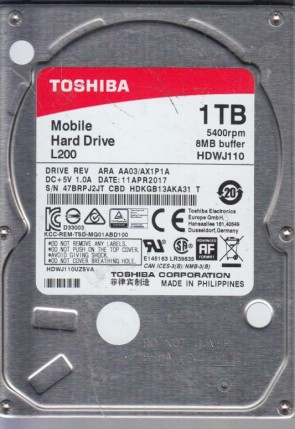
Toshiba HDWJ110 Technical Details:
Manufacturer:
Toshiba Corporation
Hard Disk Model:
HDWJ110 (Full Code: HDWJ110UZSVA)
Disk Family:
Mobile L200 Series
Form Factor:
2.5″ (9.5mm height standard notebook profile)
Capacity:
1 TB (1,000,000,000,000 bytes)
Formatted Capacity:
Approximately 931 GB
Number Of Disks:
2 Platters (500 GB per platter density base)
Number Of Heads:
4 Active Heads
Rotational Speed:
5400 RPM (Low-power fluid dynamic bearing motor)
Disk Interface:
Serial ATA-600 (SATA 6 Gb/s / SATA III)
Buffer Size:
8192 KB (8 MB Buffer Cache)
External Transfer Rate:
600 MB/s (SATA III Interface Bandwidth)
Manufacturing Location:
Made in Philippines (As verified on label)
Manufacturing Date:
11 APR 2017 (DRIVE REV: ARA AA03 / AX1P1A)
Sector Format:
512e / Advanced Format (4K physical sectors / PMR/CMR technology)
Toshiba HDWJ110 Hard Drives:
- HDWJ110 – 1 TB SATA III 2.5″ Internal Laptop Hard Drive, Mobile L200 series
- Features standard 2.5-inch unified SATA power and data connectors on the base.
Toshiba HDWJ110 Failure Symptoms:
- The “Beeping” Platter Stiction (Head Seizure):
As a notebook hard drive, it frequently handles transit movement. If jolted or dropped while spinning, the heads can get thrown off their park ramp and lock flat onto the platter surface. Upon booting, the drive stays silent mechanically but emits a faint, repeating electronic beeping or chirping alarm tone as the motor struggles to rotate against friction. - Rhythmic Actuator Clicking (Magnetic Head Wear/Failure):
Microscopic head elements can become misaligned from sudden physical shocks. When powered on, the drive spins up normally but immediately starts making a distinct, sharp “click-click-click” sound as the damaged heads fail to lock onto internal servo tracking sectors, followed by an immediate protection spin-down. - 100% Disk Active Time Freeze (4K Advanced Format Decay):
When underlying high-density 4K physical blocks begin to face magnetic decay, reading files will suffer massive read-timeout latencies. In Windows, this causes the task manager to report 100% active time while real data throughput drops to 0 KB/s, freezing the entire computer interface. - PCB Overvoltage Protection Blowout (No Power Status):
Faulty laptop charging adapters or motherboard power-rail short circuits can instantly fry the TVS protection diodes on the drive’s circuit board. The drive will show absolutely no signs of life—no spin, no vibration, and no heat—preventing any host system detection.
Toshiba HDWJ110 HDD PCB Repair:
When it comes to data recovery one of the most common problems Toshiba HDWJ110 hard drive experience is a burned circuit board (PCB). Therefore, if you need to replace the PCB, be sure to match the “PCB Number” of the current board, such as G003235C, etc.