Toshiba HDWG11A 3.5″ internal hard drive with a storage capacity of 10TB and featuring a SATA interface.
All information about the Toshiba HDWG11A hard disk drive: technical parameters, failure symptoms, HDD PCB repair and recommended retailers.
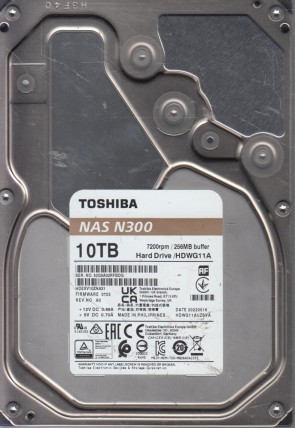
Toshiba HDWG11A Technical Details:
Manufacturer:
Toshiba Electronic Devices & Storage Corporation
Hard Disk Model:
HDWG11A (Full Code: HDWG11AUZSVA)
Disk Family:
NAS N300 Series (Network Attached Storage Series)
Form Factor:
3.5″ (Standard Internal Hard Drive Profile)
Capacity:
10 TB (10,000,000,000,000 bytes)
Formatted Capacity:
Approximately 9.09 TiB
Rotational Speed:
7200 RPM (High-velocity spindle motor for continuous operation)
Disk Interface:
Serial ATA-600 (SATA 6 Gb/s / SATA III)
Buffer Size:
262,144 KB (256 MB Segmented Cache Buffer)
External Transfer Rate:
600 MB/s (SATA III interface maximum / Approx 248 MB/s sustained internal speed)
Manufacturing Location:
Made in Philippines (As verified on label)
Firmware Version:
0101 (REV: A0)
Sector Format:
512e / Advanced Format (4K physical sectors / CMR technology)
Toshiba HDWG11A Hard Drives:
- HDWG11A – 10 TB SATA III 3.5″ Internal Network Attached Storage Hard Drive, NAS N300 series
- Features universal 3.5-inch standard internal SATA data and power connector slots.
Toshiba HDWG11A Failure Symptoms:
- RAID Array Timeout Dropouts (CCTL/TLER Timeout):
In multi-bay NAS storage arrays, if local platter bad sectors crop up, the drive’s built-in Error Recovery Control will attempt to flag them. If it takes longer than a few seconds, the storage controller logs a communication timeout and forces the drive offline, triggering a critical RAID volume error and blinking red bay status lights. - Rhythmic Actuator Clicking (Magnetic Head Wear/Failure):
Continuous 24/7 thermal stress or vibration can lead to physical head assembly failure. The drive will emit a sharp, repetitive “click-click-click” sound as the actuator arm struggles and fails to locate internal servo tracking zones, immediately followed by an automated spin-down for platter shielding. - Firmware Module Failure / Busy Lockout (0-GB Recovery Profile):
If sector corruption leaks into the hidden primary tracks (Service Area) on Platter 0, the drive’s microcode or Growth List (G-List) can overflow. The unit will spin smoothly and quietly without any clicking noises, but the host BIOS or storage controller fails to recognize the storage volume or labels it as a generic 0 GB drive. - TVS Protection Diode Blowout (Total Power Cessation):
Power supply spikes or backplane electrical surges can instantly fuse the TVS overvoltage protection diodes on the logic board. The drive will show absolutely no signs of life—no spindle rotation, zero vibration, and zero heat emission, often causing the host PSU to trip its automatic safety cutoff loop.
Toshiba HDWG11A HDD PCB Repair:
When it comes to data recovery one of the most common problems Toshiba HDWG11A hard drive experience is a burned circuit board (PCB). Therefore, if you need to replace the PCB, be sure to match the “PCB Number” of the current board, such as G4348A, etc.