Samsung HM502JX 2.5″ hard drive with a storage capacity of 500GB and featuring a Native USB 2.0 interface.
All information about the Samsung HM502JX hard disk drive: technical parameters, failure symptoms, HDD PCB repair and recommended retailers.
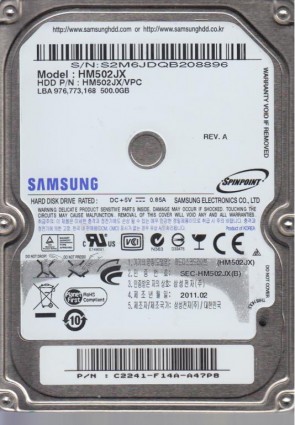
Samsung HM502JX Technical Details:
Samsung HM502JX Hard Drives:
- HM502JX – 500 GB Native USB 2.0 2.5″ Portable Drive Core, SpinPoint Series
Samsung HM502JX Failure Symptoms:
- On-board USB Port Detachment (Electrical/Physical):
Due to repetitive cable stress on the portable drive casing, the on-board Mini-USB/Micro-USB socket commonly experiences fractured pins or cracked solder pads. The drive remains entirely unresponsive—the disk will not spin, and the LED status light remains unlit or blinks weakly. - Head Impact Stiction (Beeping/Seizure):
As a portable drive, it is highly prone to drop or shock injuries. If jolted while active, the heads can get clamped flat against the platter. Upon powering up, the drive will stay quiet but emit a faint, repetitive electronic beeping or chirping alarm sound as the spindle motor attempts and fails to break past friction. - Rhythmic Actuator Clicking (Magnetic Head Collapse):
Physical falls can deform the microscopic read/write heads. When connected to a computer, the drive spins up normally but immediately starts making a distinct, sharp “click-click-click” sound as the damaged heads fail to lock onto the internal servo tracks, followed by an automated spindle shutdown. - Translator Firmware Corruption (0-Byte Failure):
Sudden cable unplugs during file execution can corrupt the drive’s microcode or Growth List (G-List). The drive will spin smoothly with zero clicking, but Windows Disk Management will classify it as “Unknown, Not Initialized” or report a storage volume of 0 Bytes.
Samsung HM502JX HDD PCB Repair:
Data recovery from a failing HM502JX presents a massive obstacle due to its native USB controller. Standard consumer recovery applications will lock up or crash because Windows cannot manage unstable USB mass storage links. Furthermore, professional firmware toolsets (like the PC-3000) cannot pass diagnostic vendor commands (VSC) through a standard USB link. To recover data from a dead PCB or locked firmware, engineers must perform a delicate “SATA Bypass Modification”: using a high-powered microscope, technicians must manually solder 4 thin jumper wires directly to the board’s high-speed SATA differential trace points (Tx+, Tx-, Rx+, Rx-) to bypass the USB chip and temporarily transform it into a standard SATA drive for stable sector cloning.
Samsung HM502JX HDD PCB Repair:
When it comes to data recovery one of the most common problems Samsung HM502JX hard drive experience is a burned circuit board (PCB). Therefore, if you need to replace the PCB, be sure to match the “PCB Number” of the current board, such as BF41-00282A, etc.