Samsung HM320JX 2.5″ hard drive with a storage capacity of 320GB and featuring a Native USB 2.0 interface.
All information about the Samsung HM320JX hard disk drive: technical parameters, failure symptoms, HDD PCB repair and recommended retailers.
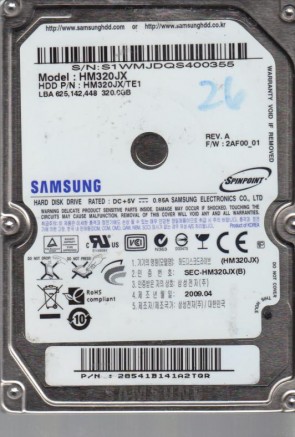
Samsung HM320JX Technical Details:
Manufacturer:
Samsung Electronics CO., LTD.
Hard Disk Model:
HM320JX (P/N: HM320JX/TE1)
Disk Family:
SpinPoint M6 (Native USB External Drive Core)
Form Factor:
2.5″ (Special slim portable profile)
Capacity:
320 GB (320,000,000,000 bytes / LBA 625,142,448)
Formatted Capacity:
Approximately 298 GB
Number Of Disks:
2 Platters
Number Of Heads:
4 Active Heads
Rotational Speed:
5400 RPM
Average Seek Time:
12.0 ms (read) / 14.0 ms (write)
Disk Interface:
Native USB 2.0 (On-board Controller, No SATA Bridge)
Buffer Size:
8192 KB (8 MB)
External Transfer Rate:
480 Mbps (Theoretical USB 2.0 Maximum / Approx 28-35 MB/s real-world)
Firmware Revision:
2AF00_01 (As verified on label)
Manufacturing Date:
2009.04 (Product of Korea as verified on label)
Sector Format:
512n (Native 512-byte legacy sectors / CMR technology)
Samsung HM320JX Hard Drives:
- HM320JX – 320 GB Native USB 2.0 2.5″ Portable Drive Core, SpinPoint M6 Series
Samsung HM320JX Failure Symptoms:
- On-board Mini-USB Port Fracture (Electrical/Physical):
Due to physical stress from the external cable link, the Mini-USB socket commonly experiences loose soldering or complete pin detachment. The drive fails to draw power—the disk will not spin, and the LED status light remains dark. - Head Impact Stiction (Beeping/Seizure):
As a portable travel drive, it frequently encounters drop or impact shocks. If jolted while spinning, the heads can clamp flat onto the platter surfaces. When connected, the drive stays quiet but emits a faint, repeating electronic beeping or chirping alarm tone as the spindle motor attempts and fails to rotate against friction. - Rhythmic Actuator Clicking (Magnetic Head Wear):
Physical drops can fracture or deform the microscopic read/write heads. When powered on, the drive spins up normally but immediately starts making a distinct, sharp “click-click-click” sound as the damaged heads fail to lock onto internal servo tracking sectors, followed by an immediate protection spin-down. - Translator Firmware Corruption (0-Byte / Unknown Status):
Sudden cable unplugs during heavy read/write cycles can corrupt the drive’s internal Microcode or Growth List (G-List). The drive will spin smoothly with no noise, but Windows Disk Management will classify it as “Unknown, Not Initialized” or report a generic size of 0 Bytes.
Samsung HM320JX HDD PCB Repair:
When it comes to data recovery one of the most common problems Samsung HM320JX hard drive experience is a burned circuit board (PCB). Therefore, if you need to replace the PCB, be sure to match the “PCB Number” of the current board, such as BF41-00235B, etc.